Internet Radio Player with a 10-Band Equalizer
Real per-band sliders on any station — not just a volume knob.
Most browser radio players give you a volume slider and nothing else. RadioPit runs every stream through a real 10-band graphic equalizer built on the Web Audio API — a chain of biquad filters sitting between the audio and your speakers, adjustable from −12 dB to +12 dB per band.
Steps
-
Play a station. Any station in your library, or one you've just added with a pasted stream URL, works the same way.
-
Click the "EQ" button in the player bar. This opens the equalizer panel next to the controls.
-
Pick a preset, or drag individual band sliders. Picking a preset from the dropdown — or dragging any slider — turns the equalizer on automatically.
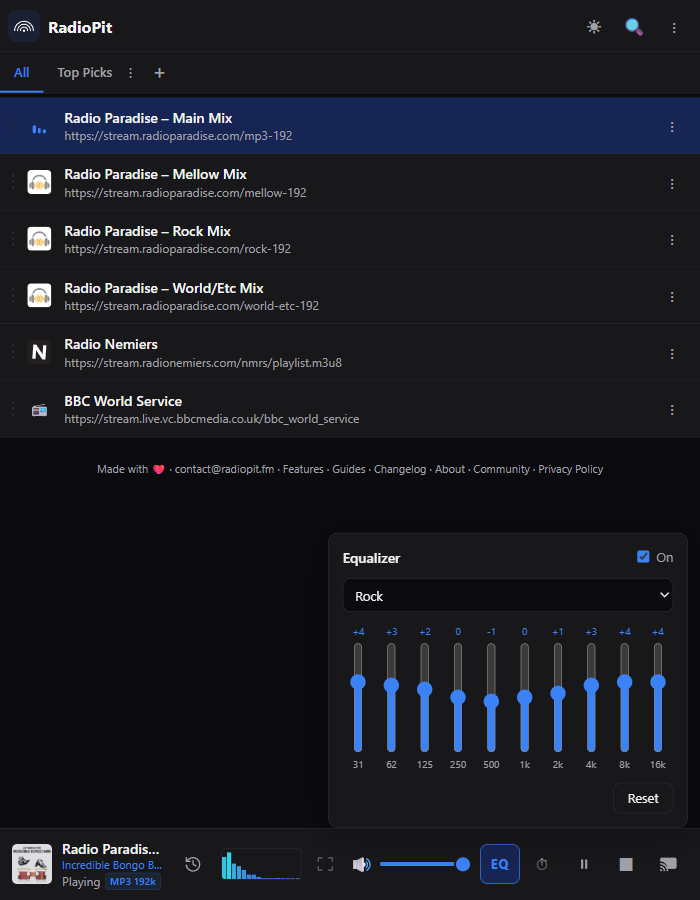
The 10 bands
31 Hz, 62 Hz, 125 Hz, 250 Hz, 500 Hz, 1 kHz, 2 kHz, 4 kHz, 8 kHz, 16 kHz. The lowest band is a low-shelf filter and the highest a high-shelf, so adjusting either affects everything below or above it rather than one narrow slice — the eight in between are peaking filters.
12 built-in presets
Vocal lifts the 500 Hz–2 kHz range, useful for talk radio and news stations. Loudness boosts both ends for quiet late-night listening. Bass Boost weights the bottom four bands for headphones that need help down low.
Turning it off, and resetting
The "On" switch at the top of the panel is a single toggle, so you can A/B your curve against the untouched stream without losing your settings. The "Reset" button snaps every band back to the Flat preset.
Try the equalizer on any station — it takes one click.
Open RadioPit